

When it comes to the best virtual tour software in real estate, the right answer really depends on what you're trying to accomplish. If you want those jaw-dropping 3D "dollhouse" models that scream luxury, Matterport is your go-to. For photographers who need total creative control and branding, Kuula is a standout. And if your primary focus is turning tour viewers into actual leads, CloudPano has built its platform around that very goal.
Finding Your Ideal Virtual Tour Software

The trick isn't finding one "perfect" tool, but the one that fits your business like a glove. A professional real estate photographer and a busy agent have completely different day-to-day needs. The photographer is thinking about workflow speed and the quality of the final product, while the agent is laser-focused on marketing ROI and converting prospects.
This guide is designed to cut through the noise. We're going to move past the generic feature lists you see everywhere and get into a real-world analysis of the top contenders. Knowing what each platform was truly built for is the key to making a smart investment.
High-Level Platform Comparison
Let's start with a bird's-eye view of how the big players compare. Each one has carved out a specific niche, targeting different workflows, budgets, and business objectives. This table gives you a quick sense of where they stand before we get into the nitty-gritty details.
| Feature | Matterport | Kuula | CloudPano |
|---|---|---|---|
| Primary Strength | Immersive 3D "Dollhouse" Effect | Creative Branding & Customization | Lead Generation & Sales Tools |
| Best For | Luxury listings, brand recognition | Photographers, custom branding | Brokerages, marketing-focused agents |
| Pricing Model | Subscription (based on "Active Spaces") | Subscription (tiered features) | Subscription & Pay-Per-Tour options |
| Ease of Use | Moderate (Proprietary camera helps) | Easy (Intuitive drag-and-drop) | Easy (Designed for quick creation) |
| Unique Feature | AI-driven digital twin creation | Advanced hotspot editor & VR mode | Integrated video chat & lead capture |
This table boils down the fundamental decision you're facing. Do you need the industry gold standard that clients immediately recognize? Or are you looking for a more flexible canvas where you can stamp your own brand on every pixel? Maybe your main goal is just to get the phone ringing by capturing leads right inside the tour.
Your software choice should directly support your business model. For a photographer, that might mean a platform offering white-labeling and portfolio features. For an agent, it could be software that integrates with their CRM and automates follow-ups.
This is the framework you should use. As we dive deeper into what each platform offers, keep coming back to this core idea. When you align a tool's strengths with your own business goals, you'll have no trouble picking the best virtual tour software to create experiences that don't just look good—they get results. The next sections will break down the must-have features and show you how these platforms perform in the real world.
Why Virtual Tours Are No Longer Optional for Modern Listings

It wasn't long ago that virtual tours were considered a novel marketing gimmick. Today, they are a core part of any serious listing strategy. They've moved from a "nice-to-have" add-on to a critical tool that directly influences how buyers engage, how quickly they make decisions, and ultimately, the final sale price. If you're a real estate pro, grasping this shift is essential to staying competitive.
The real magic of a virtual tour is its power to forge an emotional connection before a buyer even steps through the front door. Static photos only offer curated snapshots, but an immersive tour hands control over to the buyer. It lets them wander through the space at their own pace, imagining their life unfolding there. This deep engagement keeps them on a listing longer and builds a genuine sense of ownership and interest.
Driving Real, Measurable Sales Results
Let's talk numbers, because the ROI here is undeniable. The best virtual tour software for real estate isn't just about creating a cool visual experience; it’s about delivering tangible business outcomes for agents and their clients. This technology has been proven to speed up the sales cycle while getting the best possible price.
The industry data is compelling. Listings with 3D virtual tours can sell for up to 9% more and close 31% faster than listings that rely on photos alone. On top of that, Realtor.com reports a massive 87% jump in views for listings that feature a virtual tour. That kind of online interest translates directly into a 41% increase in booking requests. You can discover more key real estate tour statistics and see how they can shape your own sales strategy.
By allowing buyers to walk through a property from anywhere in the world, you dramatically expand your pool of potential clients. An interested buyer from another state or country can experience the home's flow and layout as if they were there, making them more confident in submitting a competitive offer.
This level of accessibility is a total game-changer. It obliterates geographical barriers and opens up properties to a global market—an invaluable advantage for unique or luxury listings that naturally attract a broader audience.
A Powerful Lead Qualification Tool
Beyond boosting sales, virtual tours act as an incredibly efficient filter. They save a huge amount of time and energy for everyone involved—agents, sellers, and serious buyers—by quickly weeding out people who aren't the right fit. This pre-qualification benefit is easily one of the most overlooked advantages.
Think about the old way of doing things: endless back-to-back showings. Every appointment consumes valuable time. How many of those showings end in five minutes when a prospect realizes the kitchen layout is a dealbreaker or the bedroom is smaller than they pictured? A virtual tour would have answered that question instantly.
For real estate photographers, this is how you sell the value of your work. You're not just delivering a product; you’re giving your clients a tool that:
- Qualifies Leads: Ensures that the people who book in-person viewings are already invested.
- Saves Time: Slashes the number of low-intent showings, freeing up an agent’s packed schedule.
- Increases ROI: Helps properties move faster and for more money, demonstrating a clear return.
When you frame your virtual tour packages around these solid business outcomes, you stop being just a vendor and become a strategic partner. That shift is what allows you to command higher prices and build lasting relationships with your clients.
What Really Matters in Virtual Tour Software?
When you start shopping for virtual tour software, it's easy to get lost in the marketing hype. To make a smart decision, you need to cut through the noise and focus on the features that actually make a difference in your work, whether you're a photographer delivering a product or an agent closing a deal. The right tool isn't just about pretty pictures; it’s about solving real problems.
First and foremost, it all comes down to image quality. High-resolution support is an absolute must-have. A pixelated, blurry tour can make a million-dollar listing look cheap, instantly turning off potential buyers. You’ll want software that handles HDR (High Dynamic Range) images without breaking a sweat. This is the key to balancing those bright, blown-out windows with the darker corners of a room, making every space feel natural and inviting.
If the software can't handle your images correctly, nothing else matters. You'll fail to capture the real feel of the home and leave buyers with a terrible first impression.
Making it Your Own: Customization and Interactive Features
A generic walkthrough is forgettable. A branded, interactive tour is a powerful marketing tool. Your software should let you easily add your logo, brand colors, and contact information right into the tour's interface. This is crucial for brand reinforcement, whether you're a photographer building your reputation or an agent trying to stand out.
But branding is just the start. The real magic lies in using interactive hotspots. These are little clickable points you place within the tour that can bring a space to life.
- Text Descriptions: Point out things like “brand new quartz countertops” or “energy-efficient Pella windows.”
- Image Galleries: Show off the details with a slideshow of close-ups—think appliances, light fixtures, or unique architectural features.
- Video Clips: Why not embed a quick drone flyover of the property or a clip of the cozy fireplace roaring?
- Links: Send viewers to a neighborhood guide, the local school district's website, or a downloadable property brochure.
The best tours don't just show a space; they guide the viewer's attention. When you use hotspots strategically, you turn passive viewing into an active exploration. You're telling the property's story and answering questions before they're even asked.
This kind of interaction keeps people engaged far longer, helping them build a genuine connection to the property.
Turning Clicks into Clients: Lead Generation and Analytics
For real estate agents, the end goal of any virtual tour is simple: generate leads. The best software platforms get this and build lead capture tools directly into the tour. Look for customizable contact forms you can set to pop up at just the right moment—maybe after a viewer has seen three rooms or when they go to close the tab.
Some platforms, like CloudPano, take it a step further with live video chat. This feature lets an agent jump directly into the tour with a prospective buyer, answer questions in real-time, and guide them through the property as if they were there in person. It’s a game-changer that transforms a marketing piece into a live sales tool.
Of course, none of this matters if you can't track what's working. Solid analytics are non-negotiable. Your software should give you a dashboard with the data you need:
- Total Views & Unique Visitors: See how many people are looking and how many are new.
- Time Spent: Is your tour engaging enough to hold their attention?
- Hotspot Clicks: Find out which features are grabbing the most interest.
- Heatmaps: Get a visual map of where people are "looking" the most in each room.
This data isn't just for show. If you see that 90% of viewers click on the hotspot in the master bathroom, you’ve just found a key selling point to hammer home in all your marketing.
Making it Fit: Workflow and Integrations
Finally, the software has to fit seamlessly into how you already work. For property photographers, features like automated floor plan generation from a 360 scan can be a lifesaver, cutting out hours of manual work while creating a new service you can sell. The ability to white-label a tour and hand it off to your client with a clean, simple link is just as important for a professional experience.
And for everyone involved, MLS compatibility is a must. The software has to generate both branded and unbranded links that play by MLS rules. This ensures your tours get syndicated across all the major real estate portals without causing any headaches, maximizing a listing's reach with zero extra effort.
A Detailed Comparison of Top Virtual Tour Platforms
Choosing the right virtual tour software isn’t about finding the one “best” platform. It’s about matching the tool to your specific business goals. Each of the big players—Matterport, Kuula, CloudPano, and iGUIDE—operates with a different philosophy. Understanding those core differences is the key to picking the right one for your workflow.
Let's move past the marketing fluff and feature lists to look at how these platforms perform in the real world. Whether you need a stunning 3D model, total creative freedom, a lead-generation powerhouse, or dead-on architectural accuracy, there's a tool built for the job.
The demand for these tools is exploding. Software solutions made up over 60% of the virtual tour market in 2023, which shows just how vital they've become for modern listings. With the market projected to jump from $340 million in 2023 to over $1.3 billion by 2033, real estate is clearly at the center of this growth.
Matterport: The Industry Standard for Immersion
For most people, Matterport is 3D real estate tours. Its signature "dollhouse" view and buttery-smooth walkthroughs create a high-end, professional experience that’s hard to beat. This has made it the default choice for agents selling premium properties where showing off the space and flow is everything.
The catch? It’s a closed ecosystem. To get those iconic results, you really need to use a Matterport Pro camera, and all the processing is handled on their servers. You trade creative control for consistency and ease of use.
Key Takeaway: Matterport delivers a polished, hands-off product. Its brand recognition is a huge plus—clients often ask for a "Matterport tour" by name, making it a simple upsell. The main drawback is the subscription model based on "Active Spaces," which can get expensive as your portfolio grows.
Kuula: The Photographer's Creative Canvas
If Matterport is the standardized, polished product, Kuula is the open, flexible alternative. It’s built from the ground up for photographers who want to dictate every single detail of the final tour, from the branding and hotspots to the user interface itself. Kuula works with images from just about any 360 camera, so you’re never locked into specific hardware.
Its real power is in the editor. You can build out complex, interactive experiences by embedding videos, photo galleries, and audio right into the tour. It also supports virtual staging and has a solid VR mode, making it a true Swiss Army knife for creative pros.
Kuula is the perfect fit for:
- Photographers wanting a white-label solution to deliver tours under their own brand.
- Agents looking for unique, custom tours that break the mold of standard MLS listings.
- Anyone needing a powerful but affordable subscription that doesn’t charge per tour.
CloudPano: The Lead Generation Machine
CloudPano is laser-focused on one thing: turning tour viewers into qualified leads. While it produces clean, professional 360 tours, its real value lies in the marketing and sales tools baked directly into the platform. This makes it a fantastic choice for agents and brokerages that are serious about growth.
Features like live video chat, which lets an agent jump into a tour with a buyer in real-time, are game-changers. Add in customizable lead-capture forms, scheduling tools, and floor plan generators, and you have a complete conversion-focused toolkit.
The pay-per-tour pricing model is another major differentiator. It lets you scale up or down without getting locked into a hefty monthly subscription, so you only pay for what you actually produce. It’s a flexible system that works well for businesses with fluctuating volume.
This decision tree helps visualize how your top priority—branding, lead gen, or floor plans—points to a specific software solution.
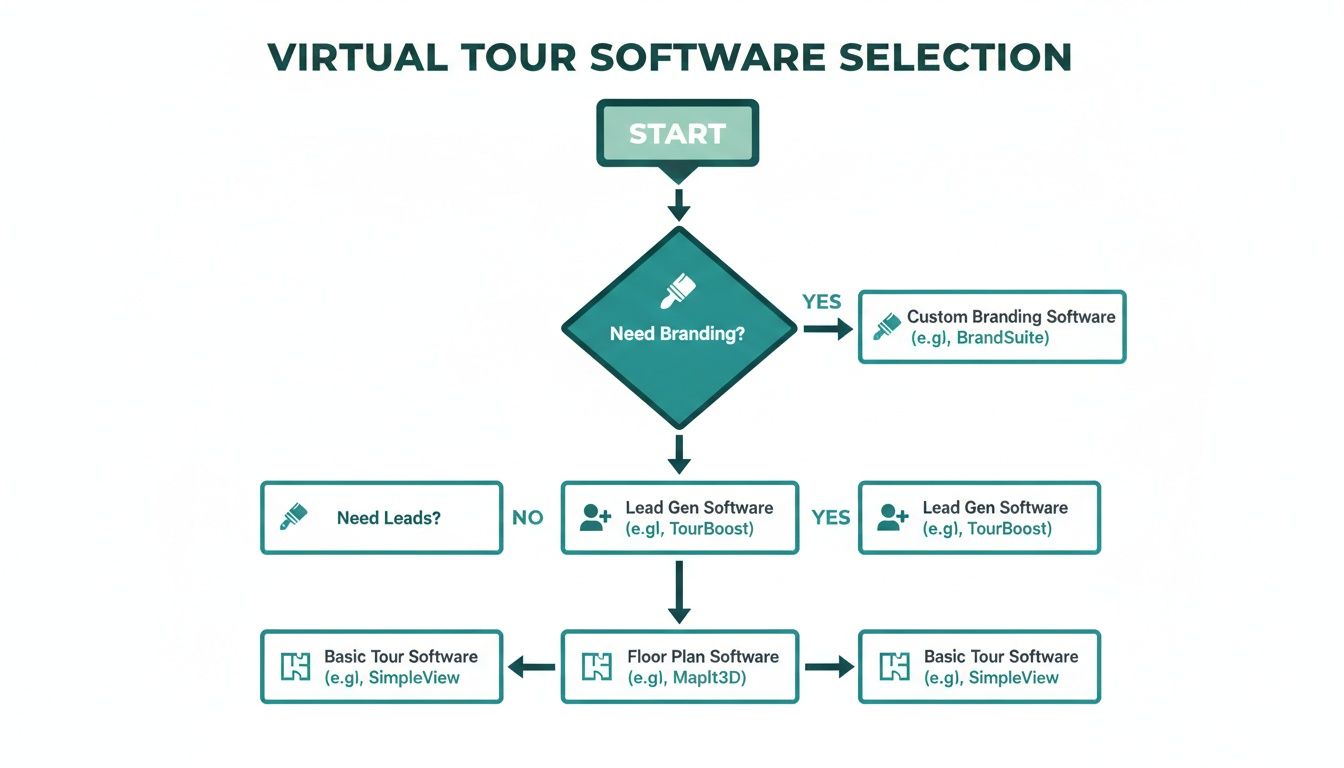
As you can see, if your primary goal is to capture client information and start a conversation, a platform like CloudPano is built from the ground up to do just that.
iGUIDE: The Champion of Accuracy
Finally, we have iGUIDE, a platform that has carved out a niche by being obsessed with measurement accuracy. While it produces great-looking virtual tours, its standout feature is the ability to generate incredibly precise, interactive floor plans complete with detailed room dimensions and square footage calculations.
This makes iGUIDE an essential tool in specific scenarios where "close enough" just doesn't cut it.
iGUIDE is the go-to for situations like:
- Commercial Real Estate: Where lease agreements often depend on exact square footage.
- New Construction: Giving architects, builders, and designers reliable as-built plans.
- Appraisals and Insurance: Providing verifiable measurements for official documentation.
The system uses a special camera that pairs a 360 lens with a LiDAR scanner to capture spatial data. This focus makes it less of a general marketing tool and more of a specialized instrument for jobs that demand technical precision. If you're just getting started with 3D scanning, our guide for photographers looking to offer Matterport 3D tours is a great resource.
Feature-by-Feature Software Comparison for Real Estate
To make things even clearer, here’s a side-by-side look at how the four platforms stack up on the features that matter most to real estate professionals.
| Feature | Matterport | Kuula | CloudPano | iGUIDE |
|---|---|---|---|---|
| Best For | Immersive 3D "Dollhouse" Experience | Creative Control & Custom Branding | Lead Generation & Sales Tools | Measurement Accuracy & Floor Plans |
| Core Strength | Premium, hands-off 3D model generation | Highly customizable, white-label tours | Integrated marketing & live chat features | LiDAR-powered precision measurements |
| Camera Requirement | Matterport Pro Camera (recommended) | Any 360 camera or DSLR | Any 360 camera | Proprietary iGUIDE PLANIX Camera System |
| Pricing Model | Subscription (based on "Active Spaces") | Subscription (flat monthly/annual fee) | Pay-Per-Tour or Subscription | Per-Tour Processing Fee + Hardware |
| Hosting | Matterport Cloud (required) | Kuula Cloud or self-hosted | CloudPano Cloud | iGUIDE Cloud (required) |
| Lead Capture | Basic contact form | Customizable forms via hotspots | Advanced (forms, scheduling, live chat) | Basic contact information |
| Floor Plan Quality | Good (auto-generated schematic) | Basic (can be added) | Good (can be ordered) | Excellent (survey-grade, interactive) |
By breaking down what each platform truly excels at, you can move past the sales pitches and choose the software that genuinely aligns with the services you offer and the results your clients demand.
Integrating Virtual Tours into Your Marketing Workflow

Picking the right virtual tour software is a huge step, but it’s really just the starting point. To see a real return on that investment, you have to make the technology a core part of how you do business. After all, what good is a stunning virtual tour if no one ever sees it?
For photographers and agents, this means building a repeatable system for everything from creation and pricing to distribution. A solid workflow is what turns a cool-looking tour into a tool that actually gets results—whether that's a new photography client or a qualified buyer lead for an agent.
This whole process starts way before you hit "publish." It begins on-site and depends on how you sell and deliver the final product.
Best Practices for the Photoshoot
The quality of your final tour is locked in the moment you set up your camera. No software, no matter how advanced, can rescue a sloppy photoshoot. The key to creating an immersive experience that feels polished and professional is all about consistency and preparation.
First things first: stage the property well. Clutter is just as distracting in a virtual tour as it is in person, and empty rooms feel cold and uninviting. I always try to shoot when the natural light is best, usually mid-morning or late afternoon. Then, I'll bring in soft, artificial lights to kill any harsh shadows and give the space a warm, welcoming feel.
One of the biggest mistakes I see is people rushing the capture. You have to give each room the attention it deserves and think about how a viewer will move through the space. The goal is a smooth, logical flow, like you're actually walking through the home—not just jumping between random points.
And please, stabilize every single shot. A tripod is absolutely non-negotiable for 360 photography. It gets rid of any camera shake and makes sure every panorama is perfectly sharp. This is the foundation of a high-quality tour.
A Photographer's Guide to Pitching and Delivery
As a real estate photographer, you're not just creating a tour; you're selling a powerful marketing asset. When you pitch your services, frame the conversation around the tangible business benefits you're providing to agents, and use real data to make your case.
Pitching Your Services Effectively:
- Talk ROI: Agents listen to numbers. Remind them that listings with virtual tours can sell for up to 9% more and close 31% faster. You're not just selling a cool feature; you’re offering them a faster path to their commission check.
- Highlight Time Savings: Explain that a virtual tour acts as a 24/7 open house. It does the heavy lifting of filtering out casual lookers, so only truly interested buyers schedule in-person showings.
- Offer Tiered Packages: Don't make agents guess. Create simple, clear packages that bundle photos, a virtual tour, and maybe a 2D floor plan. It makes their decision easier and naturally increases your average sale.
When it's time to deliver, keep it professional. Use your software's white-labeling option so the tour is branded to you, not the platform. Always provide your clients with two links: a branded one for their website and an unbranded, MLS-compliant version. To dive deeper into the nuts and bolts, you can learn more about creating real estate virtual tours and how to build them into your offerings.
An Agent's Guide to Marketing and Promotion
For agents, a virtual tour is a marketing Swiss Army knife—it should be used everywhere. Don't just upload it to the MLS and call it a day. You have to put it to work.
Start by placing the tour front and center on your website's property listing page, right next to the photo gallery. A big, obvious "Virtual Tour" button is the way to go; you want to make it impossible for visitors to miss.
From there, it’s all about getting it in front of as many eyes as possible.
Maximizing Tour Exposure:
- Social Media Campaigns: Cut short video clips or create GIFs from the tour to share on Instagram and Facebook. Add a clear call-to-action like "Tour the entire home from your couch!" and link directly to the full tour.
- Email Marketing: Make the virtual tour the star of your email newsletters. A subject line like "Just Listed: Take a 3D Tour of 123 Maple Street" is far more likely to get opened and clicked.
- Digital Advertising: Use the tour as the creative for your paid ad campaigns. You can target potential buyers in a specific zip code and serve them an interactive ad that lets them start exploring right away.
When you weave the tour into every marketing touchpoint, it stops being a passive feature and becomes an active lead-generation machine that works for you 24/7.
Picking the Right Virtual Tour Software for Your Business
Let's get straight to it: there’s no single "best" virtual tour software. The right choice really comes down to what you're trying to accomplish for your business or your clients. This final breakdown connects the dots between the platforms and your specific job, so you can make a decision with confidence.
The market for this tech is exploding. It's expected to hit $1,373.5 million by 2034, a massive jump from $492.2 million in 2025. Real estate is the engine behind this growth, making up a huge 31.71% market share because buyers now expect to see a home inside and out before they even visit. If you want to dig deeper, you can read the full market analysis on virtual tour software trends to see where things are headed.
The Best Tool for Your Role
To make this simple, here are my direct recommendations based on who you are and what you need. Each platform has its own sweet spot.
For High-End Luxury Agents: When you're selling a lifestyle and need an experience that feels premium, nothing beats Matterport. The brand name carries weight with high-net-worth clients, and that signature "dollhouse" view instantly communicates quality. It’s the go-to for justifying a higher price point.
For Independent Photographers: If you’re all about creative control, branding, and keeping costs predictable as you grow, Kuula is your best bet. You can use almost any 360 camera, customize everything, and deliver a completely white-labeled tour that makes your brand the star of the show.
For anyone who needs dead-on architectural accuracy, the choice is simple. If you're shooting commercial properties, new construction, or anything requiring exact measurements, iGUIDE is the only real answer for survey-grade floor plans.
- For Growth-Focused Brokerages: Is your main goal turning online viewers into active leads? Then CloudPano is built for you. With built-in features like live video chat and lead capture forms, it turns a virtual tour into a genuine sales tool. Their pay-as-you-go model is also great for teams focused on ROI.
These pointers should help you see which platform lines up with your goals. And remember, 3D tours work great alongside traditional video. You can check out our guide on how photographers can create compelling video walkthroughs to round out your service offerings.
Answering Your Top Questions About Virtual Tour Software
When you're diving into virtual tours, a few practical questions always pop up about cameras, costs, and getting your work seen. Let's clear the air on some of the most common things real estate pros ask, so you can avoid any surprises and hit the ground running.
Do I Really Need a Special Camera?
The short answer is no, not always—but the camera you choose definitely shapes the final product. While a platform like Matterport gets its signature 3D dollhouse effect from its specialized cameras, most software these days is designed to be camera-agnostic. That opens up a world of possibilities.
You can actually create a great-looking tour with a few different setups:
- 360 Cameras: This is the sweet spot for most professionals. Cameras from brands like Ricoh Theta or Insta360 give you that perfect blend of quality, speed on-site, and a reasonable price point.
- DSLR or Mirrorless Cameras: If you're after absolute top-tier image quality, nothing beats a good old DSLR. Using a standard camera with a panoramic head to stitch multiple high-res photos together gives you maximum control, though it does take more time.
- Smartphones: Believe it or not, some platforms let you create a basic tour with just your phone. It's a fantastic entry point, but for a professional listing, you'll want to step up to dedicated gear.
What Should I Expect to Pay for the Software?
Pricing is all over the map, so you'll want to find a plan that fits how you work. Most companies fall into one of two camps: a monthly subscription or a pay-per-tour model.
Platforms like Kuula and Matterport lean into subscriptions, where you pay a recurring fee for a set number of active tours and access to their feature set. On the other hand, a service like CloudPano offers a pay-per-tour option, giving you the flexibility to pay a one-time fee for each tour you publish.
It really comes down to volume. A busy real estate photographer cranking out multiple tours a week will almost certainly save money with a subscription. An agent who only needs a tour every now and then will probably find the pay-as-you-go model makes more sense.
Can I Put My Virtual Tour on the MLS?
Absolutely. Any virtual tour software worth its salt has a dead-simple way to get your tours onto the MLS. This is a non-negotiable feature for agents and the photographers they hire.
Typically, the software gives you two links: one branded with your logo and contact information, and one that's completely unbranded. That unbranded link is the one you need for the MLS, as it complies with their rules against advertising. It’s a small detail, but it’s essential for getting your listing seen everywhere it needs to be.
Ready to connect with top-tier real estate photographers who are experts in creating stunning virtual tours? Find vetted professionals in your area on PropPhoto. https://propphoto.com

